Protector Handover Flow - UI Specification
Purpose & Scope
This specification covers the UI components, user flow, and frontend logic required to implement the protector handover feature. It is the primary technical document for frontend development of this feature.
- [ ] To review: State management, API, Error handling
Requirements Implemented
Related Specifications
User Interface & Design
Source of Truth: Figma
Key Screens & Components
This section provides an overview of the primary UI states. For detailed design specifications, please refer to the Figma link above.
1. Handover Initiation
The outgoing Protector initiates the handover from the worksite management screen.
2. 6 digit code
A modal prompts the outgoing Protector to confirm they have completed site handover briefings, and then displays a 6-digit code on confirmation. The outgoing Protector should give this to the incoming Protector. While the 6 digit code is displayed, the UI should prevent page refresh or navigating away.
3. Handover In Progress
While the handover is pending acceptance, both Protectors see a banner indicating the session is active.
4. Takeover by Incoming Protector
The incoming Protector navigates to the worksite and selects 'Takeover site' from the menu options.
5. Verification
The incoming Protector enters the 6-digit code provided by the outgoing Protector.
5. Error States by Screen/Step
1. Handover Initiation
- Error: Connectivity lost → Show a screen informing user that connection is required to complete handover.
2. 6 Digit Code & Confirmation
- Error: Invalid code → Error message displayed, allowing them to try again
3. Handover In Progress (Waiting States)
- Error: Manual cancellation → Confirmation dialog → Cancellation message to other party
4. Incoming Protector Acceptance
- Error: Incoming protector offline → Continue waiting (no error state needed) until timeout
Frontend Logic & Data Flow
State Management
The frontend application SHALL maintain the state of the handover session, subscribing to updates from the server. The state includes:
idleinitiatingpending_confirmationpending_acceptancefinalisingsuccesscancellederror
API Interaction
Initiate Handover:
- Trigger: User clicks "Initiate Handover".
- Action: Call
POST /api/handoverwith the required site and user IDs. - UI: On success, transition to the
pending_confirmationstate and display the QR scanning modal.
Check Handover Status:
- Trigger: When incoming Protector navigates to worksite.
- Action: Call
GET /api/site/{siteId}/handoverto check if handover is pending. - UI: Show handover acceptance screen if handover is waiting for them.
Accept Handover:
- Trigger: Incoming Protector clicks "Accept Handover".
- Action: Call
PATCH /api/handover/{id}withstatus: "completed". - UI: Transition to
finalisingstate and then tosuccess.
Error Handling
The UI SHALL gracefully handle API errors.
- On 4xx errors (e.g.,
HANDOVER_CONFLICT), display a user-friendly message from the error response. - On 5xx errors, display a generic "Something went wrong" message and offer a retry option.
- On network failure, display an offline indicator.
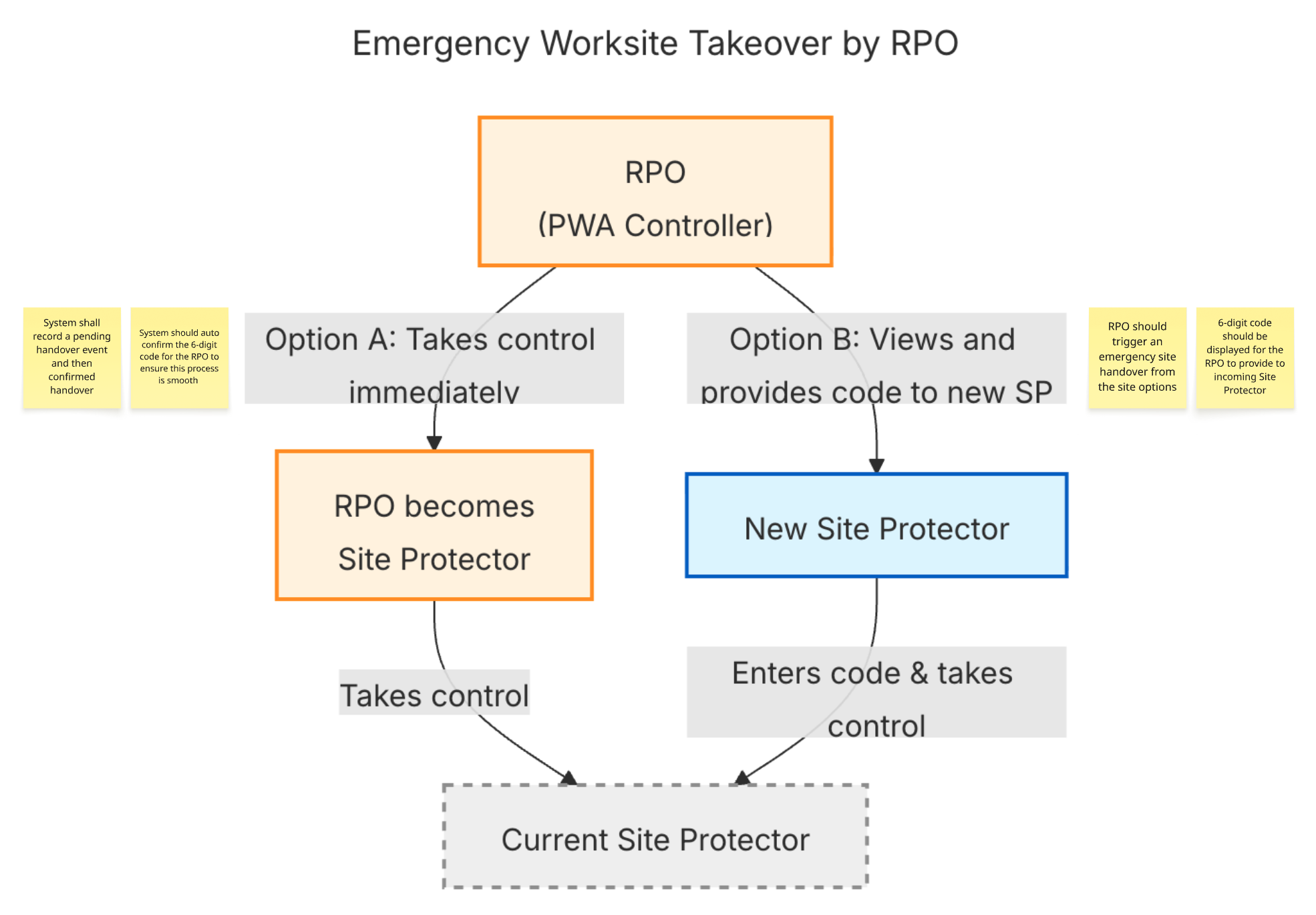
Handover Flows
Routine Handovers
Emergency Handovers