Protection Management
Purpose & Scope
Enable Rail Protection Officers (RPOs) and Site Protectors (SPs) to establish, operate, and hand back protection for a Protected Work Area (PWA) that may contain one or more Worksites. This includes the states and transitions required for safe worker operations but excludes voice communication with Train Control and non-rail permits.
Actors
- Rail Protection Officer (RPO)
- Site Protector (SP)
- Workers (view-only within this domain)
Artefacts & Traceability
This domain is documented through the following artefacts. Each requirement references its related designs, technical specifications, and verification, and those documents back‑link to the requirement.
- Requirements (
requirements/): outcome‑focused statements using EARS, one file per feature. - Designs (
designs/): links to Figma user flows and key UI states. - Technical specifications (
tech-specs/): API contracts and data models that implement the requirements. - Verification (
verification/): verification plan and per‑feature matrices mapping EARS items to test cases. - Decisions (
decisions/): Architecture Decision Records (ADRs) captured during the work.
Domain Context (high level)
- A PWA can be Inactive or Active.
- A Worksite can be Inactive, Authorised, or Enabled (active for work).
- Single-site PWAs allow the Worksite to be enabled when the PWA is activated.
- Multi-site PWAs require per-site Authorise (RPO) then Enable (SP).
Detailed acceptance criteria live with each requirement in requirements/ and are verified via verification/.
PWA Layout Examples
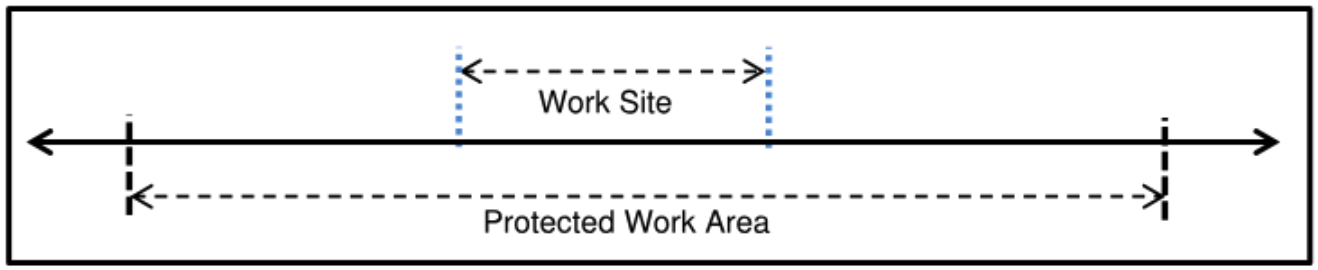
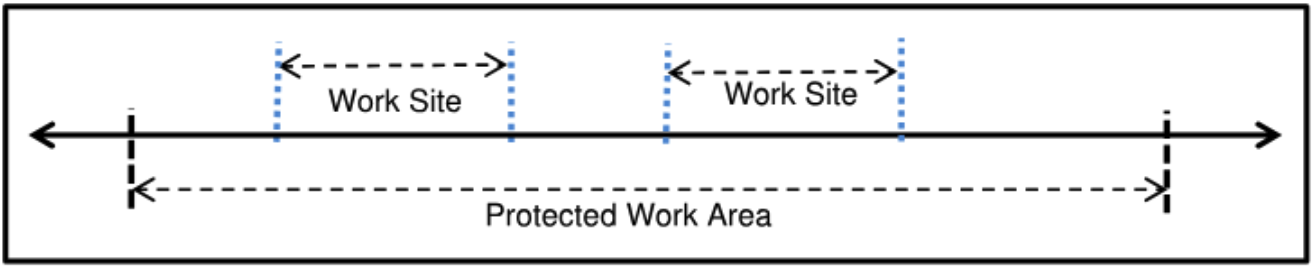
System Flows (reference)
Single-site
Multi-site
State Models (reference)
PWA
Worksite
Diagram Coverage → Requirements
- PWA Activate
- Single-site quick activate (also enables sole Worksite):
requirements/req-prot-001-pwa-activate-single-site.md - Multi-site activation (Worksites remain Inactive):
requirements/req-prot-002-pwa-activate-multi-site.md
- Single-site quick activate (also enables sole Worksite):
- Worksite transitions (Multi-site)
- Authorise (Inactive → Authorised):
requirements/req-prot-003-worksite-authorise.md - Enable (Authorised → Enabled):
requirements/req-prot-004-worksite-enable.md - Hand back (Enabled → Inactive):
requirements/req-prot-006-worksite-hand-back.md
- Authorise (Inactive → Authorised):
- PWA Hand back (Active → Inactive)
- After preconditions met:
requirements/req-prot-005-pwa-hand-back.md
- After preconditions met: